
How to Post a Burning Bridges AI Video on TikTok, Reels and Shorts
Your Burning Bridges AI video is a 15-second landscape MP4. Here is how to post it on TikTok, Instagram Reels and YouTube Shorts: as is, on a 9:16 blurred background, or cropped.
The short answer
Burning Bridges AI gives you a 15-second landscape MP4 (16:9; our 768P result is 1344 × 768 at 24 fps) with the original party soundtrack. There's no vertical option yet, so you have three choices:
- TikTok: upload it as is, or make a 9:16 version with a blurred background so it fills the screen.
- Instagram Reels: landscape uploads are accepted, but a 9:16 version looks better and is required if you want to boost the Reel.
- YouTube Shorts: you need a 9:16 (or square) version. A 16:9 upload is treated as a regular video, not a Short.
For most people, the blurred-background version is the best all-rounder: nothing is cut off, and it fills a phone screen.
What each platform accepts
These are the rules we found in each platform's official documentation on October 12, 2026.
| Platform | Landscape 16:9 upload | What we recommend |
|---|---|---|
| TikTok | Accepted. TikTok's video ad specs list 9:16 as recommended and also accept horizontal 16:9. | 9:16 blurred version, or post as is |
| Instagram Reels | Accepted for aspect ratios between 1.91:1 and 9:16, per Instagram Help. Only full-screen 9:16 Reels can be boosted. | 9:16 blurred version |
| YouTube Shorts | Not a Short. YouTube only categorizes square or vertical videos up to three minutes as Shorts. | 9:16 blurred or cropped version |
One detail for Instagram: its help page lists a minimum of 30 fps and 720 pixels. The 768P file is 24 fps. If Instagram rejects it or the quality drops, export the 9:16 version at 30 fps, as in the command below.
Three ways to make it vertical
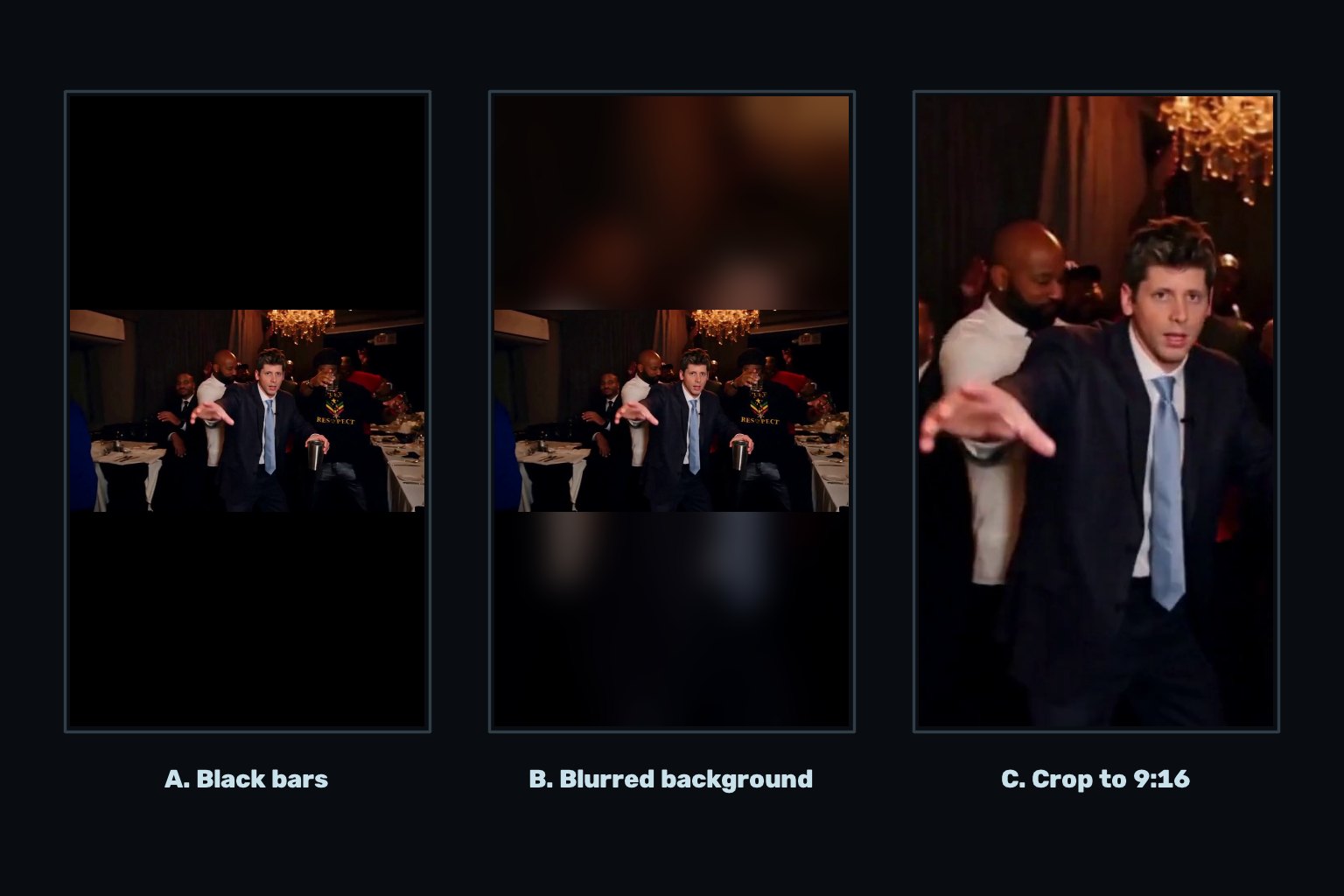
A. Black bars (post as is). No editing needed. The video sits in the middle of the screen with empty space above and below. Fine for TikTok, but it looks small on a phone.
B. Blurred background. The full landscape video sits in the middle of a 1080 × 1920 frame, and a blurred, zoomed copy of the same video fills the space above and below. Nothing is cut off, and the frame feels full. This is our recommendation.
C. Crop to 9:16. The video is zoomed until it fills the vertical frame. It's the most immersive, but a 9:16 crop of a 16:9 frame keeps only about a third of the width. The lead moves around the room and the guests sit at the edges, so parts of the action leave the frame.
Make a 9:16 version with a blurred background
On your phone: open the MP4 in a video editor such as CapCut, set the project ratio to 9:16, and choose a blurred background for the empty area. Then export at 1080 × 1920 and 30 fps.
On a computer with FFmpeg: this command creates the blurred-background version, keeps the original audio untouched, and outputs 30 fps:
ffmpeg -i burning-bridges.mp4 -filter_complex "[0:v]scale=1080:1920:force_original_aspect_ratio=increase,crop=1080:1920,boxblur=20:2[bg];[0:v]scale=1080:-2[fg];[bg][fg]overlay=(W-w)/2:(H-h)/2" -r 30 -c:v libx264 -crf 18 -pix_fmt yuv420p -c:a copy burning-bridges-9x16.mp4
Replace burning-bridges.mp4 with the name of the file you downloaded from My videos. We ran this exact command on our real result: it produced a 15.1-second, 1080 × 1920 file at 30 fps with the original soundtrack intact.
Sound, captions and cover
- The audio is already there. Your MP4 carries the original 15-second reference soundtrack. If you also add a song from the app's sound library, mute the original track first so the two don't play over each other.
- Platforms have their own music rules. If a platform mutes or limits the audio after upload, swap in the matching sound from that platform's library.
- Keep captions out of the middle. With the blurred layout, the top and bottom areas are free for text, and the action stays visible.
- Pick a cover where the lead faces the camera. The close-ups in the first seconds usually work well.
- Be clear it's AI. Burning Bridges AI is an independent tool, not affiliated with Drake. Saying the video is AI-made helps avoid confusion, and some platforms ask you to label realistic AI content.
Don't have your video yet? Follow the step-by-step guide or open the workspace.